Over the last 12-18 months, LLMs have enabled, and if I’m honest encouraged, me to ship more side projects than in the previous 10 years combined. The models have got to the point where for most of what I build writing the code is a solved problem. The bottleneck moved to the feedback cycle, how quickly I could see what had been built, decide what should change and get that back to the agents. Removing this friction was the next logical step.
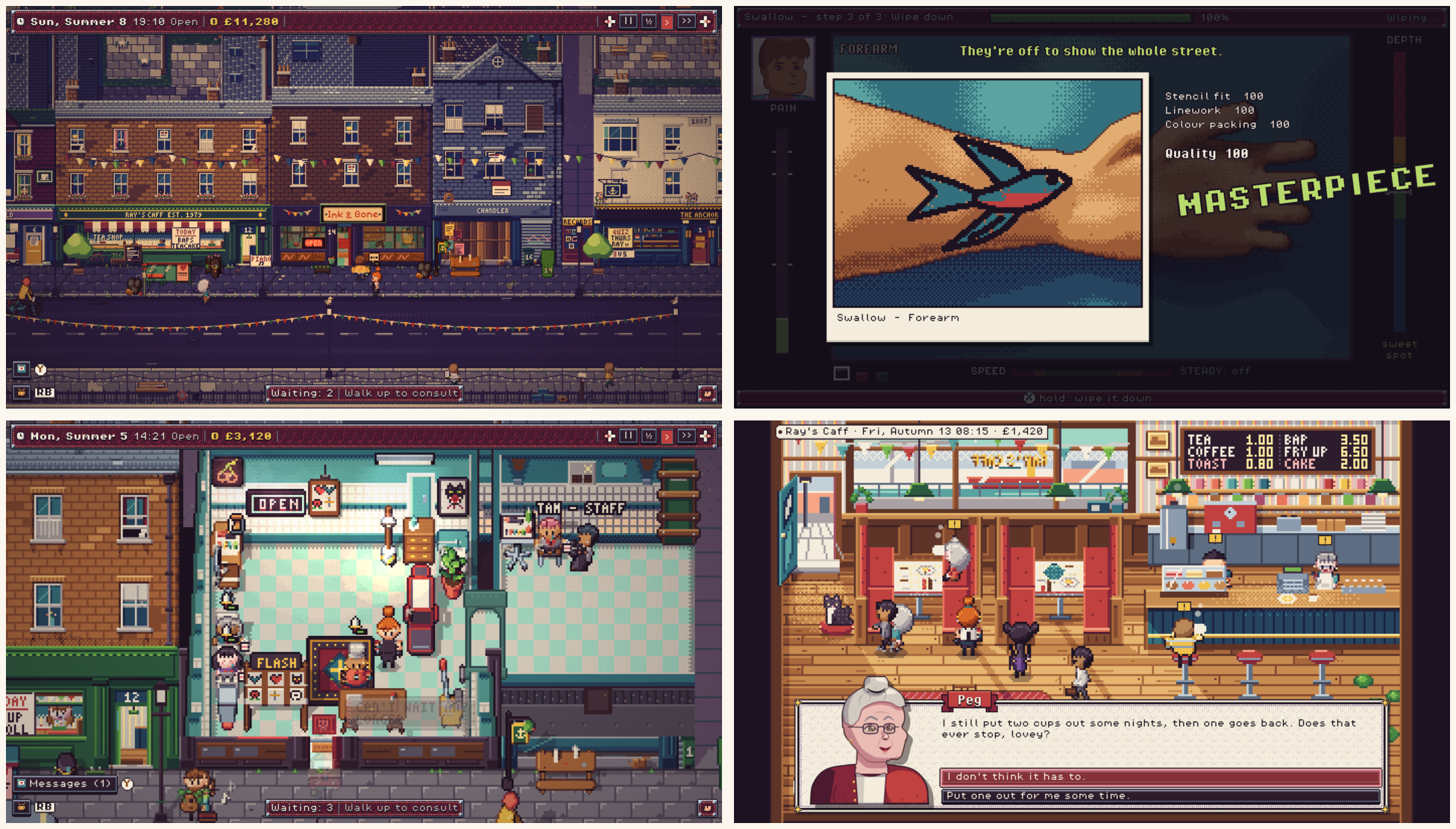
I’ve spent a lot of that time working through different harnesses, skills and agent setups, and for the last six weeks I’ve been running the most complete version of it yet. The project was a cozy pixel art game, but this post is about the process it ended up running on, and how and why each piece of it got added.
I never set out to build a software factory. I didn’t design this process up front, and if you’d shown me the end state at the start it would have looked like massive overkill. It evolved one step at a time, Each time something slowed me down I set about removing that pain point.
One caveat up front, it’s a hobby project with no real users, this let me move much faster with a high risk appetite than I would have been able to elsewhere.
Where I started
My usual process with AI is to iterate on a plan with an agent until I’m happy with it, ending up with a detailed, phased markdown file. I then hand each phase to a sub agent, which works in its own worktree and reviews and tests its changes before merging back to main. I manually kick off each phase and often interrupt the agents whilst watching them work to course correct etc.
For this project I deliberately went a level higher. I wrote a detailed PRD describing what I wanted to build, and left out the tech stack and implementation details entirely. The PRD described the outcomes with the agents now owning the how with a large degree of autonomy. I then started a loop with a prompt along these lines:
Start a loop. Each iteration, review the PRD and build the next phase of what we don't have yet. If the PRD is complete, review what we have, research online and append improvements you think we should make to the PRD.

Each night publish a build to my server. Save any questions you have for me until after this release, then message me asking for feedback along with the questions you want answered
The prompts in this post are cut down to give a feel for them. The real ones were much longer and more detailed.
The loop sat alongside a CLAUDE.md setting the engineering standards: work TDD, validate tests pass before and after merging, use a vertical slice architecture so each feature lives together in one place, and keep the code clean, along with all the other guidance I’ve built up over the last year for getting the best out of coding agents.
The nightly release
I ran the loop 24/7 for the first week. The important part of that prompt is the second paragraph. Rather than stopping to ask me things all day, the agent saved its questions and sent them with the nightly build, along with screenshots and a summary of its day. One message a night, then I’d playtest the build and reply. I was genuinely excited to get that message each night. The research it was running often led to additions to the PRD, features I’d not considered which made this even more interesting.
The weak spot was feedback. To change direction or do any course corrections I had to jump on, stop the loop, make the change and start it again. The loop was running autonomously and it was delivering new builds to my SteamDeck over the air so, having to be in the office and back at my desk felt like an interruption. A playtest could lead to 20+ tweaks or new ideas and I needed a much better path of least resistance to getting this into the “factory”.
Giving the loop a feedback board
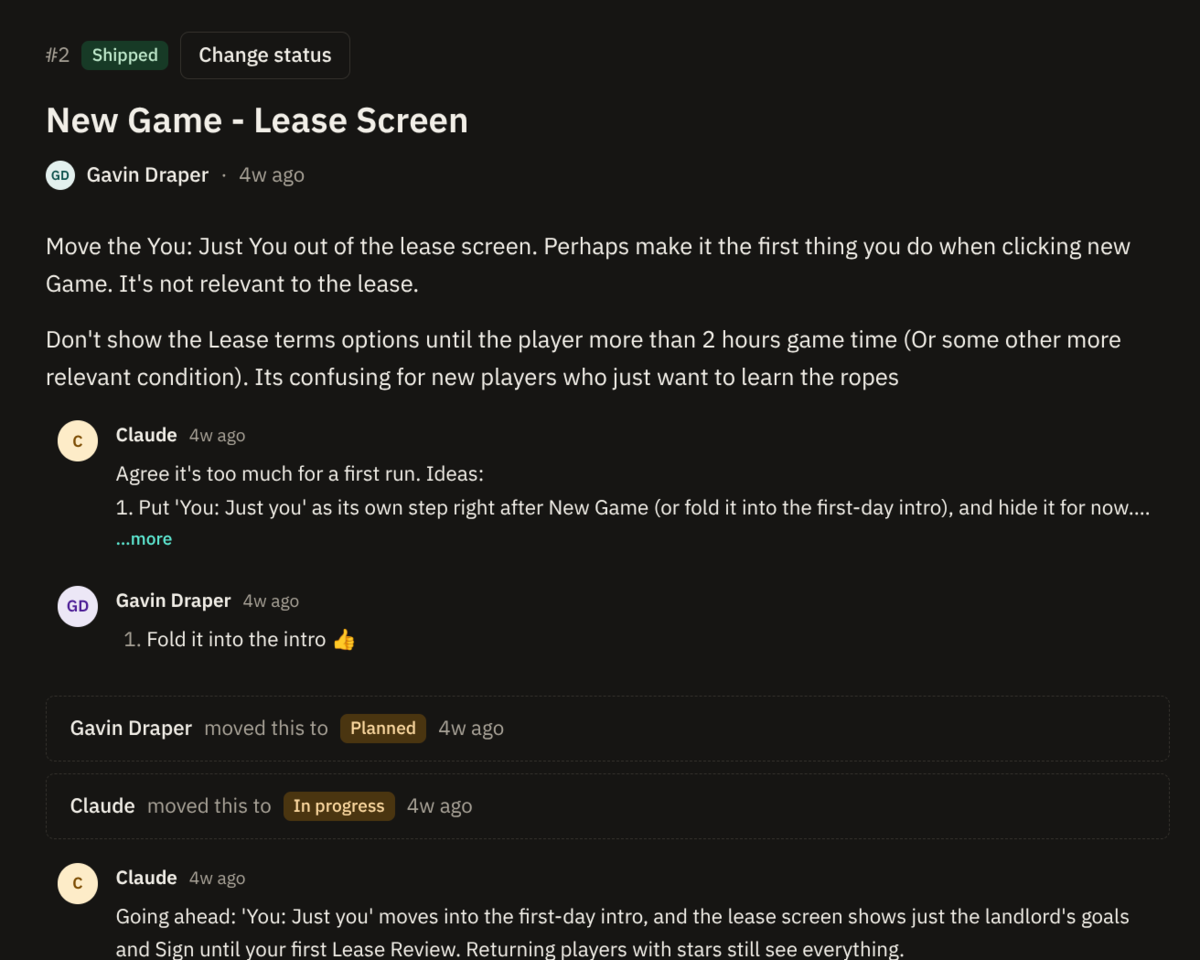
I asked a separate Claude session to build a web app along the lines of UserVoice, which I called Upswell. It lets me submit ideas, add comments, screenshots, and move items through statuses from Idea to Planned, In Progress, Committed and Released. I gave the loop an API key and added something like this to its prompt:
Check for any updated items in our feedback API, comment on them with any questions and action the ones you can, moving them through to In Progress and Committed, and when you release, move them to Released.Claude absolutely nailed it. It was straight into discussions with me in the comments, and within five minutes it had dropped a set of mockup screenshots into one of the items and asked me to pick one. Feedback went from “sit at my desk and stop the loop” to “type it on my phone wherever I am”, and the loop picked it up automatically. By this point it was running 10 agents in parallel, and my machine was the limiting factor. To make the high level of autonomy work with changes flowing quickly from idea to production the test automation was something that was baked in from the start and ended up being the limit for my single machine agent loop, how many test packs could I run in parallel before the machine maxed out (About 10).
Agents all the way down
After a couple of weeks I split the single loop up. Instead of one agent doing everything, each status on the board got its own agent, and the board became the hand-off between them. Move a card to Committed and the QA agent picks it up, move it to Merged and the release agent does. It works like a team picking up work items, with me moving cards around on my phone.
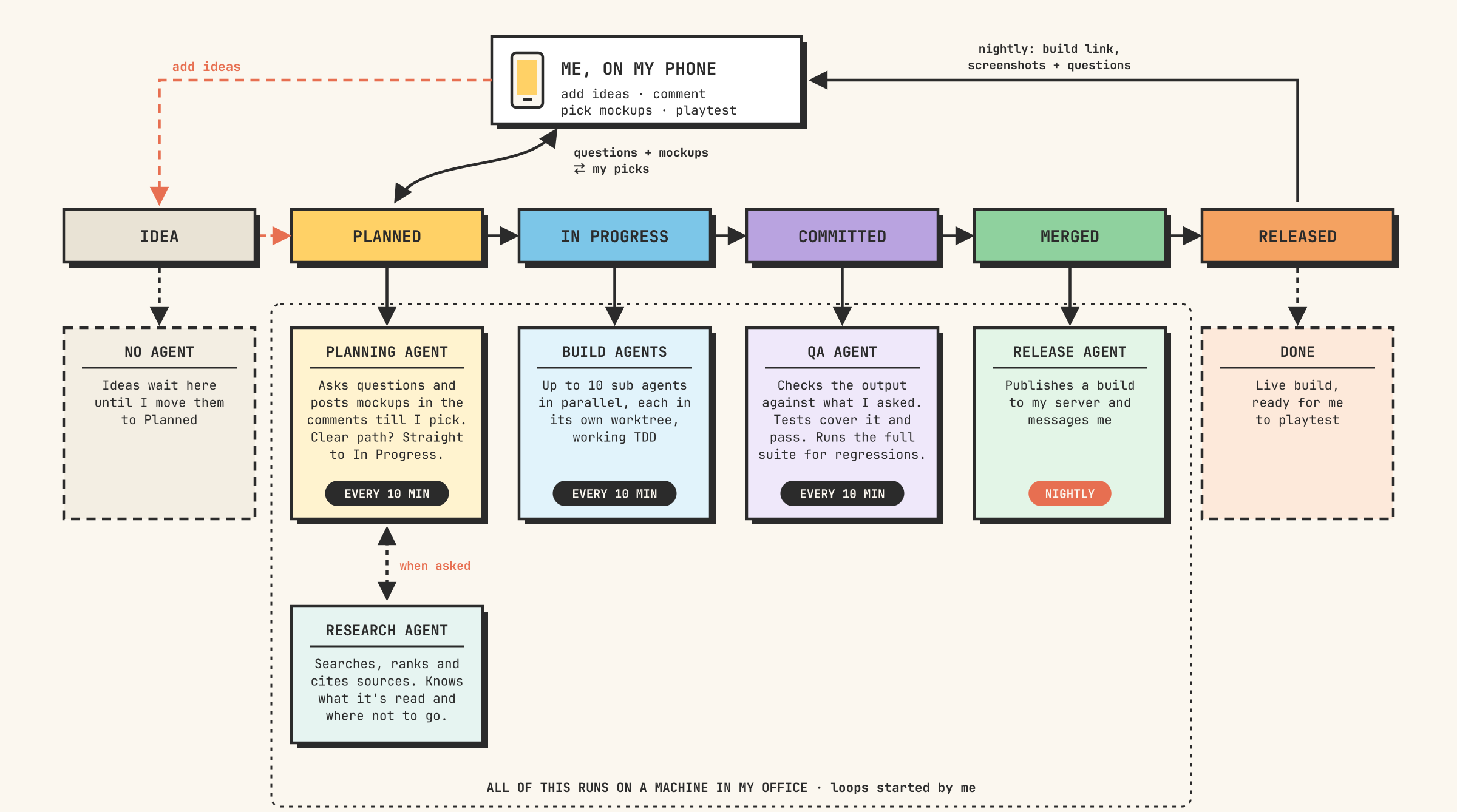
The Idea column has no agent, it’s my backlog. Moving a card to Planned is the one manual step, and it’s the decision that then starts the loop. From there:
- Planning agent: asks questions in the comments, often posts mockups for me to choose from, and we go back and forth until I pick one. If there’s a clear path from the outset it moves the card straight to In Progress.
- Research agent: runs alongside planning when asked, going off to find out how other people have solved a problem and coming back with ranked, cited findings. I also had this researching similar games, reading reviews and bringing back suggestions to ensure we mitigate negative feedback elsewhere.
- Build agents: a loop running up to 10 sub agents in parallel, each in its own worktree, working TDD.
- QA agent: checks the output against what I asked for, makes sure the tests cover it and pass, and runs the full test suite for regressions.
- Release agent: ensures all the tests pass (Runs a much larger test pack than required of the agents up to this point), publishes the nightly build and messages me.
Each agent moves the card on when it’s done. The release agent runs nightly and everything else runs on a 10-minute cron, with each loop skipping its turn if the previous run is still going or all our agent slots are taken. All of it runs on a machine in my office, and I start the initial loops myself.
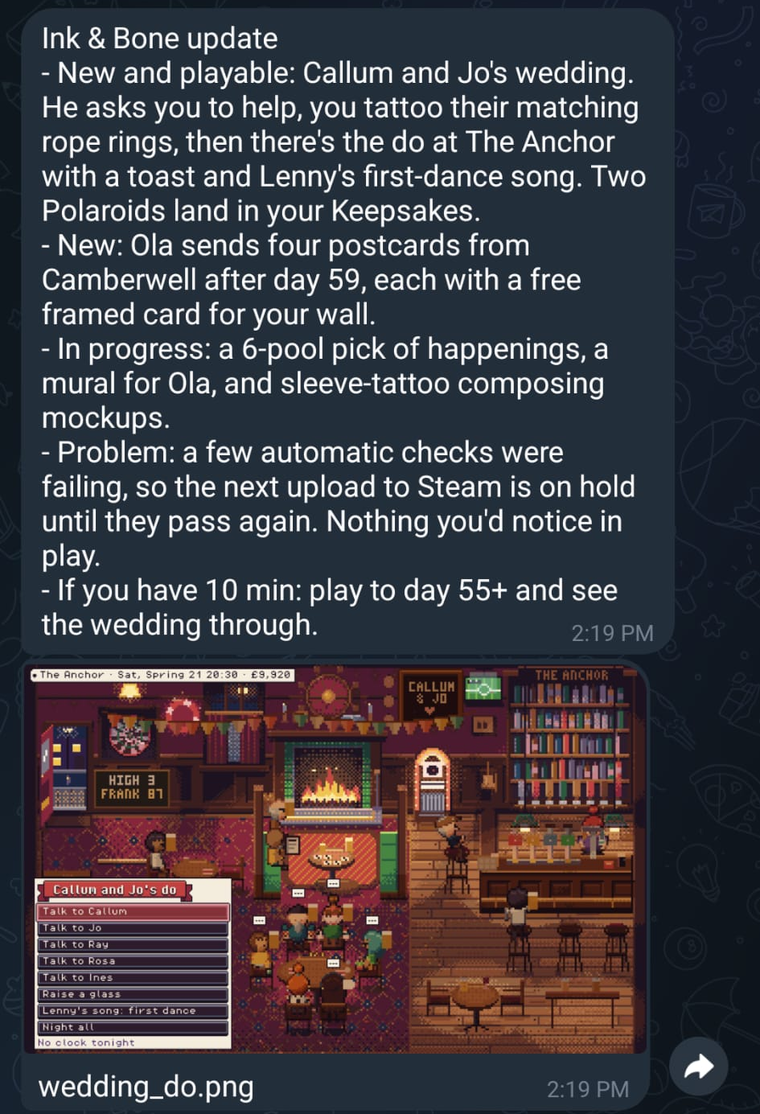
On top of the nightly build, a Telegram bot sends me an update twice a day with what’s new and playable, what’s in progress, anything that’s gone wrong, and screenshots. They were fun to open while I was doing something else, and each one ended with suggestions for something to playtest if I had ten minutes spare.
Why so many agents?
I could have kept one big agent doing everything. Splitting it up meant each agent could be small, repeatable, focused and tuned for one job.
The research agent had a well defined flow of its own, it kept its citations, a record of the research it had already read and the searches it had already run, a list of places not to go, and instructions for ranking what it found. Dangerous Dave on Reddit with one post to his name is not the same as an in-depth article from a respected industry site. None of that belongs in the build agent’s head, and stuffing it all into one prompt would have made every job worse and burned a lot of additional tokens with context bloat.
When I asked why players drift away from cozy games after the first few weeks, it came back with a report built on Steam achievement stats, review samples and social media posts. Every claim had a citation, there was a table ranking each recommendation by how strong the evidence was.
| Finding | Strength of evidence |
|---|---|
| Game loop leaves no reason to return after x hours | Strong |
| Game loop not fun | Medium |
| Late game money has no purpose | Weak |
It also made each agent easy to improve. When research came back thin, I tuned the research agent. When QA let something through, I tuned QA, without worrying about what else the change might break.
A lot of it emerged
Plenty of the process came from the agents rather than me. They started interacting with me in ways I never planned for.
The mockups were never in a prompt. When I kicked off an early version of the planning agent, I didn’t expect it to start posting mockups to Upswell for me to choose from and tagging me for review (It saw the API supported attachments on comments and just started adding screenshots and designs). Once it did, I explicitly added it to the guidelines: this is how I want you to work.
Another time, one of the agents asked if it could make changes to Upswell itself to add a Merged status so it could treat it like a release queue for the release agent.
The process also learned from its own mistakes. Every 10 cycles a review agent wrote a retro, and anything that went wrong became a rule. Early on, the orchestrator force-removed some agents’ worktrees without checking them and lost work. The retro turned that into a rule (back up any dirty worktree before removing it) and a git hook that logs every checkout so it couldn’t quietly happen again. By the end the repo’s tools folder held over a hundred scripts like that, and the agents wrote every one of them.
What came out the other end
- Game code: 470,000 lines of GDScript, 169,000 lines of tests, with over 6,600 test cases.
- An art pipeline: The agents built a scripted pipeline that models things in Blender and renders them down to pixel sprites on a fixed 71 colour palette, with Aseprite files as the editable source. That’s 223 Python scripts (95,000 lines), 236 Blender files and 2,190 Aseprite files, producing around 9,700 sprites, 68 characters and 215 tattoo flash designs. The whole art set rebuilds from source in a few minutes.
- Audio: music and sound effects generated in code, no samples. 20 scripts produce all 264 sound files.
- Writing: 333,000 words of dialogue across 240 files.
- Tooling: around 40,000 more lines of Python and shell for builds, releases, the board, tracking flaky tests and pushing builds to my Steam Deck.
- Decisions: 832 numbered, dated decisions, each with its reasoning, from D-001 on day one (“Runs of 12 in-game weeks are the structure”) to D-832 the day before I wrote this. Alongside those sat 101 design docs and 163 review write-ups.
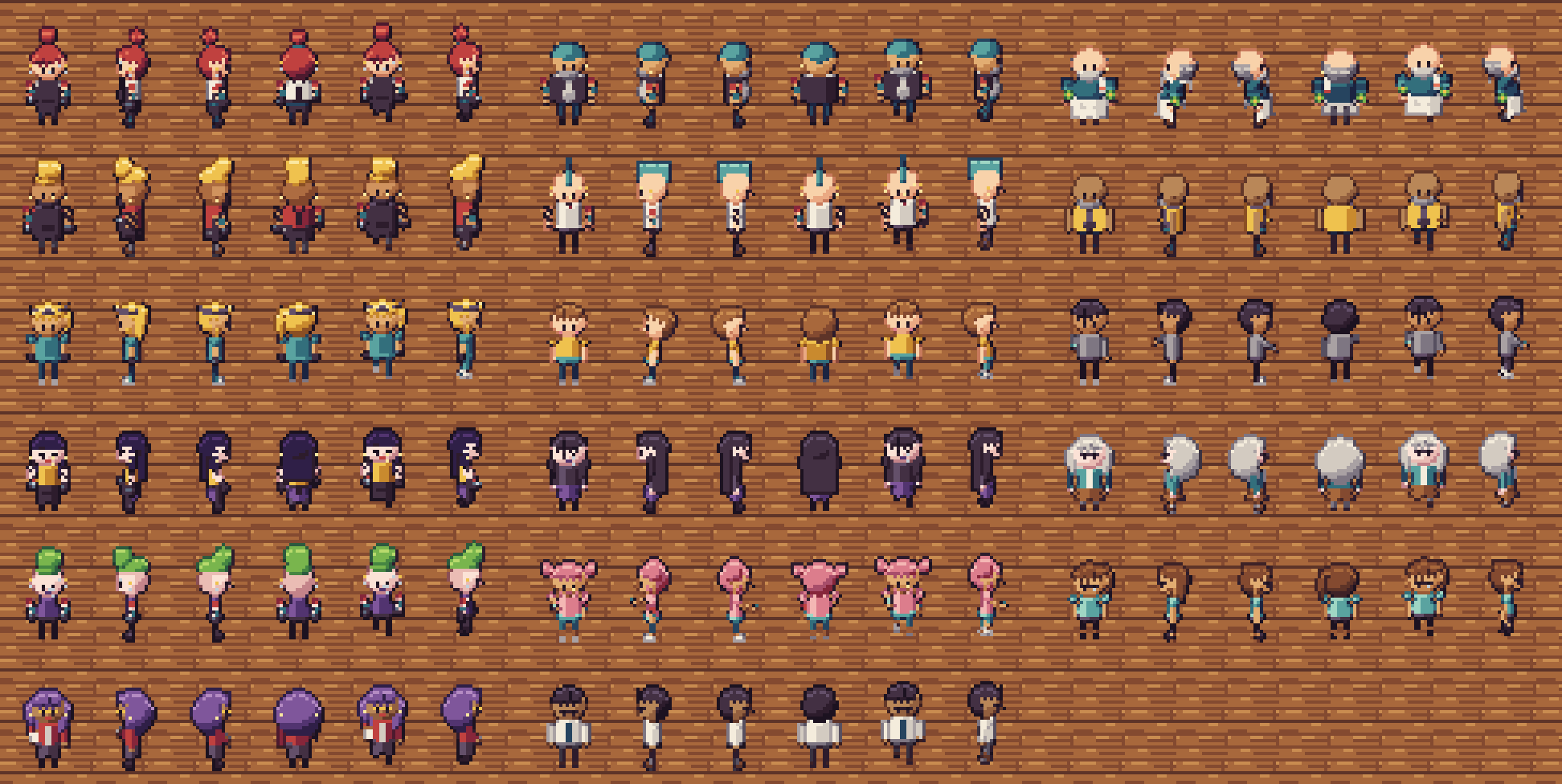
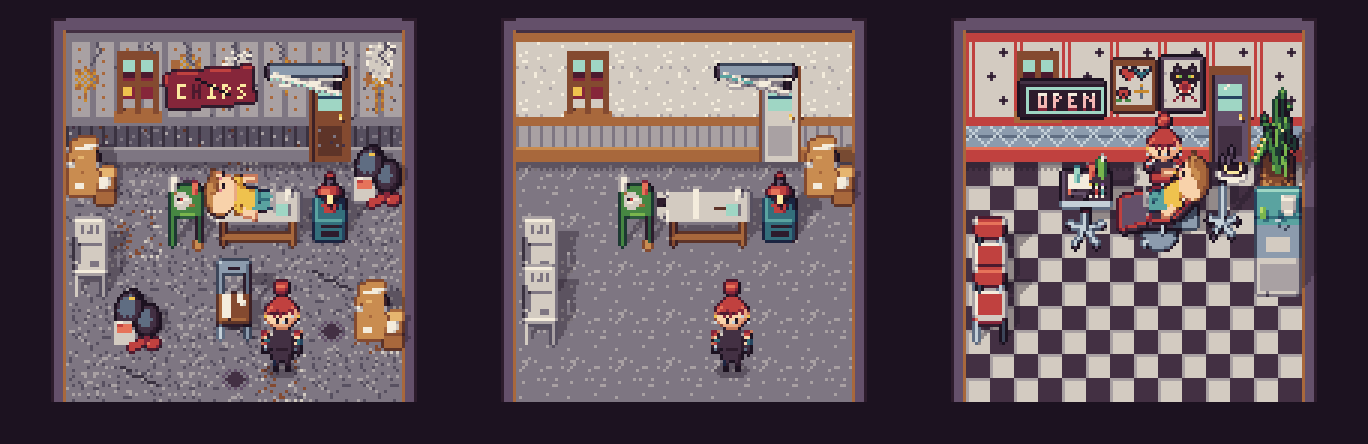
All of it came through nearly 5,000 commits, peaking at 390 in a single day. I remember when I first kicked it off, I forgot about it for a period then when I signed in to GitHub and saw 250 commits raised that day I jumped straight to the assumption that something had gone very wrong.
Once the loop was running, my workflow for the last 6 weeks became a playtest and feedback session each evening, followed by a minor check in first thing each morning to check everything was still running (1-3 hours a day it the most). Using LLMs the way I used to, I’m confident it would have taken at least 2-3 times as long. Without LLMs at all, it’s not something I could have taken on as a hobby project, my guess would be well over a year.
Where it fell down
The writing was the weak spot. Scenes were often incoherent with each other, and some of it simply made no sense. The tests could check that every line was wired up and every trigger fired, but not whether the story held together. Because it was written so fast, catching that meant a fairly large manual review to correct it. I built additional tooling to support here so complete stories could be extracted as a single script and be reviewed by myself and an LLM as one unit.
I’ve no doubt there’s some bloat in the code as well. It hasn’t affected how quickly we could build on it or the end result, though. The line count isn’t a brag, it’s there to show the project got large enough to prove the process holds up at real scale.
What did it cost?
All of this ran on a personal Claude Ultra plan, with no API billing on top. Most weeks the agents were running close to 24/7, and I only hit the weekly usage limit a couple of times, usually within 24 hours of it resetting anyway.
For a sense of scale, here are Claude Code’s own usage stats for the period.
97% of those tokens were read from the prompt cache. Almost all of that was agents re-reading project context they’d already loaded, which the cache makes cheap. Opus 5.5 did most of the work, and the longest session ran for nearly three days straight.
The orchestrating session was told to stay lean and hand the real work to sub agents. Each one started with a clean context, did one job and reported back a short summary. That kept every context small and focused, which kept the agents sharp and the costs down. Auto compact kept the orchestration context in line when needed but it grew so little with everything being delegated it rarely became a problem.
What made it work
The agents were very good at building what I asked for but I very much had to ensure what I was asking for was sustainable. Had I not have focussed on automation, reusable tools, skills, scoped agents, documentation and a clean architecture that was designed for agents (Vertical slice really helped here) then by the time the project got to half the size it is now things would have ground to a halt.
Batch your touchpoints
Saving questions for the nightly release meant the agents weren’t sat waiting on me, and I got one considered conversation a day instead of constant interruptions.
Make the board the contract
Each status means one thing and has one owner. An agent doesn’t need to know what the others are doing, just which column is theirs and where the card goes next.
Give agents tools they can drive
Whatever the agents work with needs a good CLI or API. That’s why I built Upswell rather than reaching for an existing tool: I needed something lightweight that my agents had real control over. They drove it through a small command line client:
upswell queueplanned and in-progress itemsupswell show 42an item, its comments, attachmentsupswell comment 42 "..." -f a.pngreply with mockups attachedupswell start 42 "the plan"move it to In Progressupswell landed 42 <commit> "..."code complete, awaiting releaseupswell ship 1.4.0mark the release shippedBuild for extension from day one
The second commit in the repo was a rule about architecture: small focused pieces, composition over inheritance, and new content added through data and registries rather than by editing core code. An architecture doc with worked examples for common changes (a new furniture item, a new customer type, a new save field with its migration) had to be kept up to date by every agent that touched it. By the end, 148 data files drove the game, and all the dialogue lived in its own story format with its own checker, so most new content was a data change rather than a code change.
Build tools for the people who aren’t engineers
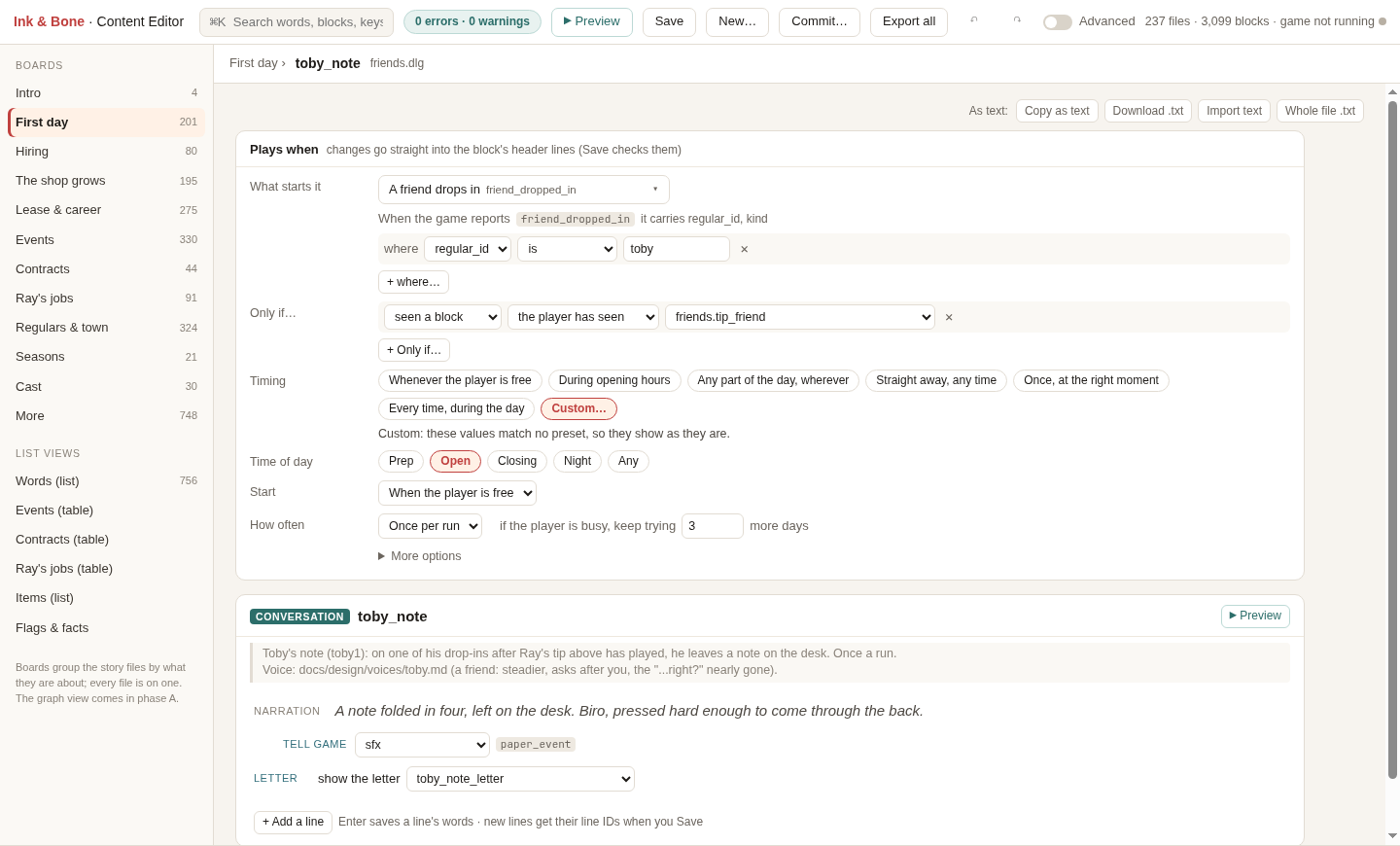
I asked for a local web editor so a writer could change conversations, cutscenes, the triggers that start them, events and item descriptions without touching code. It edits only the lines you change, runs the game’s own checks on save, and has a preview button that launches the game straight into that scene.
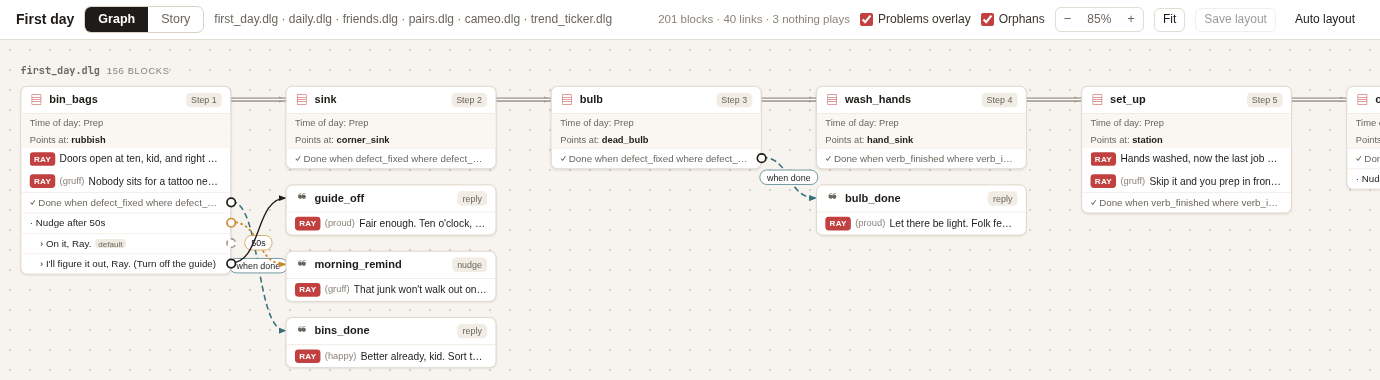
It also draws every part of the story as a graph, so a writer can see how scenes connect: what plays first, where each choice leads, and what nudges the player along if they stall.
Artists got the same treatment. Art from the pipeline lands as Aseprite files, an artist can claim any piece and redraw it by hand, and their version always wins over the generator.
Turn repeatable work into skills
Anything done more than a couple of times got written down once as a skill or a script, instead of being worked out from scratch each time. Want a new sprite? There’s a skill covering where the files live, which pipeline to run, the palette and design rules, the guardrails, and a checklist to review the result against. Releasing a build to the Steam Deck and working the board are skills too, and committing, testing and taking screenshots are single commands. That saves tokens, because the agent isn’t rediscovering the process, and it keeps each new sprite consistent with the last.
Test the actual game
Unit tests weren’t enough on their own, so I asked for:
- Screenshot tests: Screenshots rendered from the real game, with automated checks such as a character’s name tag never being hidden behind the HUD.
- Playthroughs: the game played with a simulated controller as part of the full test run.
- Soak tests: a bot plays the real game for hours, logging memory, frame times and errors.
- Simulations: a fast-forward of the economy with bot players, to spot pacing problems weeks into a run.
The skills were built with context on what levels of tests to run at which points in the process. The Simulation and Soak tests are very intense so those ones run nightly and will raise fixes or questions for me if any issues are found.
Write decisions down
Building up context in the repo, and recording decisions as we went rather than leaving them in my head or buried in old sessions, is why the process worked as well at the end as it did at the start. A few entries from the decision log:
T-003 2026-10-18No god objects: new state means a new component, not new fields on GameStateT-005 2026-10-18Saves carry a version and upgrade through numbered migrationsT-022 2026-10-18Game rules are pure classes, shared by the game and the headless simD-035 2026-10-19Cozy means low panic, not low challengeD-080 2026-10-20Minigames are never interrupted; the world waits until they finishD-091 2026-10-21Dialogue moves to screenplay-style story files that designers can editSeveral times I asked for something that went against a decision we’d made weeks earlier, and instead of just doing it, the agent called me out. It quoted the decision, when we’d made it and why, then asked whether I wanted to reverse it or rethink the idea.
Me thinking things through became the bottleneck
With the code no longer the constraint, the limit was how fast and how well I could give feedback. The board made feedback easy, which was the whole point, but it also made it too easy. I’d sometimes fire off 20+ ideas in a 10-minute window, and things moved so fast that I stopped thinking them through. I had to course-correct a few times, and every time it came down to me asking for conflicting things or not thinking an idea through.
From hobby project to reality
This is the extreme end, and it was incredibly fun throwing something in one end of the pipe and seeing what came out the other. There is a lot here though that is just as usable on real systems, it’s just missing some of the guardrails.
What this has meant for my knowledge of what I’ve built, I know the shape of the codebase, the architecture, where things live and why, from the docs and the decision log. I don’t know the detail, and I couldn’t tell you what most of the code says. Some things I’d tweak to make the process a little safer
- Gates where they’re needed. The board makes it easy to put a human checkpoint on any move that warrants one, like signing off a plan, reviewing code before it merges or approving a release.
- Treat the board as untrusted input. With real users posting feedback, anything on the board or anything the research agent reads online could try to steer an agent.
- Tests for the agents. If I change a prompt I want to know the agent still behaves.
- Someone accountable. A named human owns every change that goes out.
None of that changes the basic setup though: a backlog that agents pick up, an agent for each stage, and a human steering from the board.
Where it goes next
Over those six weeks the role shifted from writing plans for agents, to writing a PRD and letting them plan, to running a board: move a card, answer a question, playtest a build in the evening. I was still in it every day, just focused on outcomes rather than the how.
Two things I really want to tweak next….. The first is the machine in my office, if it reboots, or a loop isn’t restarted, everything stops. The second is the cron loops. Waking every agent every 10 minutes to check for changes is clunky. I want the next version to be event driven, with an Upswell update triggering the right agent the moment a card moves.
It’s been a huge mindset shift but I do still believe engineering discipline was a large factor in making this work, without it things would have moved very fast at the start but completely stalled, burned tokens and created a mess as soon as things started to grow. Product Engineering thinking is more important than ever, what are the outcomes we’re looking for?, defining the north star early and holding to it rather than iterating away from it, thinking ideas through before firing them off, and giving feedback clear enough to act on.
If you’re curious about the game itself, here’s the Ink & Bone dev trailer. The agents made that too.